

 Contact Us

 Home /
 Delivery Robot Accessibility: Tray Reach, Controls, and Assisted Handoffs
Delivery Robot Accessibility: Tray Reach, Controls, and Assisted Handoffs
Oct 12, 2026
Commercial Carpet-Vacuuming Robots: Pile, Edge Transitions, and Maintenance Limits
Oct 12, 2026
Robotic TIG Filler-Wire Delivery: Feed Angle, Arc Access, and Stop-Start Quality
Oct 12, 2026
Suction Cup Layout for Flexible Sheets: Sag, Local Stress, and Controlled Release
Oct 12, 2026
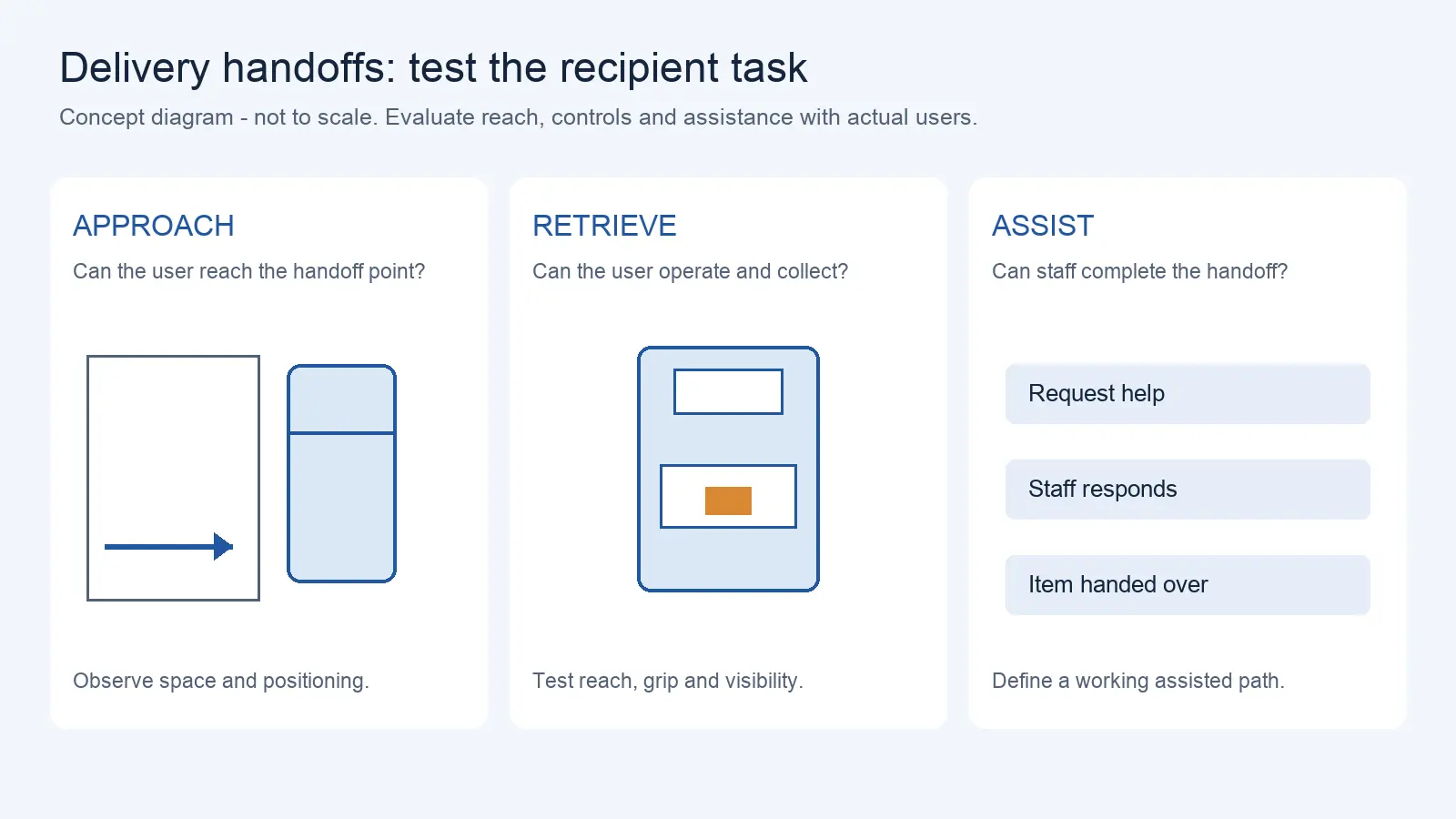
A delivery robot can navigate to exactly the right spot and still fail the person waiting for it. The guest may not be able to reach the tray, may not be able to work the screen, or may not be able to open the compartment. Accessibility is not about whether the robot arrives; it is about whether the people who need to collect their items can actually do so. That is a usability question, and it needs its own evaluation, separate from navigation and delivery.
Define the Users and Handoff Tasks
Accessibility evaluation starts with the real range of users and the real tasks they perform, not with labels.
List the tasks a user must complete: find the robot, identify it as theirs, open or present the compartment, reach the item, take it out, and close or release the compartment. Then consider the range of users who must do these. A person standing, a person seated, a person using a wheelchair or a walker, a person with limited grip or reach, a person who cannot read small text or hear a prompt, a person with a child or bags in hand. The point is not to sort people into categories; it is to describe the physical and cognitive demands of each task and ask whether a range of users can meet them.
Overall route, payload and building conditions are explained in food delivery robot workflow requirements; this guide focuses on recipient usability.
A useful method is to define, for each task, what the user must physically and cognitively do, and then to check that against real users. This keeps the evaluation on observable tasks rather than on assumptions about who can use what.
Evaluate Reach, Grip, and Visibility
The physical layout of the robot sets the first barrier or the first opening.
Reach matters in three dimensions: the height of the compartment, its depth, and whether the user can get their hand or their body close enough. A compartment set at a height that suits a standing adult may be out of comfortable reach for a seated person or a child. Depth matters because a deep compartment may require reaching past the opening.
Grip and force matter at the opening. A latch, a sliding door, or a hinged lid can have a pull force or a grip requirement that a user with limited hand strength cannot meet. Visibility matters because the user has to see the compartment and the item, which depends on lighting, the viewing angle, and whether the opening is obscured.
Published accessibility guidance is useful here for the reach and clearance principles, but it is written for the built environment and for web content, not for a specific delivery robot. The U.S. Access Board's guide on operable parts, for example, addresses reach ranges and clear floor space for controls in the built environment. China's GB 55019-2021 addresses accessibility in buildings and municipal engineering. The Barrier-Free Environment Construction Law has broader provisions concerning accessible facilities, information exchange, and public services. Neither source alone establishes a specific delivery-robot tray dimension; assess any obligations for the intended site and service separately with qualified local advisers. Those principles can inform the evaluation, but the actual dimensions that matter are the ones of the specific robot, and the person who confirms them is a real user. Ask the supplier for the compartment dimensions and opening force, and then test them with users.
Review Controls and Instructions
The interface is where a delivery robot is most likely to exclude users, and it is often the easiest part to improve.
Look at the controls: touchscreen, physical buttons, or both. Check the touch target size, the required force, and whether the screen can be used without precise pointing. Check the instructions: the text size and contrast, whether there is an audio prompt, and whether there is a language option. A touch-only interface with small targets can exclude a user with low vision or limited motor control; a physical button or a voice prompt can keep them in the process.
Consider multiple modes. A robot that offers touch, voice, and a staff-assisted path gives users more than one way to complete the task. W3C's WCAG offers web and digital-interface accessibility principles that may inform touchscreen/software assessment, but it is not a stand-alone physical robot conformity standard and cannot be cited as evidence that a robot is accessible. Physical reach, controls, and assistance must be verified in the installed service context. The evidence that the interface works is a test with users, not a standards reference.
Test Mobility-Aid and Staff Access
The space around the robot determines whether a user with a mobility aid can approach and complete the handoff.
Clear floor space at the robot is the first requirement: enough room for a wheelchair to approach, turn, and position next to the compartment without being blocked by the robot itself, furniture, or other guests. The approach has to work from the side as well as the front, because a user may not be able to face the robot straight on.
Staff access is the other half. Staff need to reach the robot to assist, to load, and to intervene when a user cannot complete the task. If the robot is positioned so that staff cannot get to it without moving the guest or the robot, assistance becomes slow and awkward. Test the approach with real users and real mobility aids, and observe where the space or the layout blocks them. Do not assume a general dimension from a guideline applies to your installation; confirm it on site.
For hotel portfolios, these service steps connect to hotel robot deployment and service workflows.
Provide an Equivalent Assisted Route
Not every user will complete the handoff independently, and the design has to give them a working alternative.
An assisted route means a staff member can complete the delivery for the user, or bring the item to them, without the user having to manage the robot at all. Design the assisted route to meet the same delivery standard as self-service. Assign responsibility for assistance, set a comparable waiting-time target, and monitor remaining access barriers. A robot that can only hand off to a person who can operate it turns a service improvement into a barrier for everyone else.
Define the assisted path as part of the system, not as an exception to be improvised. Who is called, how quickly they respond, and how the guest requests help are all part of the design. This is the point where accessibility becomes a service commitment rather than a product feature, and it is where a site can most reduce the chance that a guest is stranded by the technology.
Record Usability and Limitations
The result of the evaluation is a record of what worked and what did not, for which users, on which tasks.
Build a task-based usability checklist: for each handoff task, note whether the user could complete it, what they needed, and where they got stuck. Include the assisted route as one of the tasks. Record the conditions, such as lighting, the item's size and weight, and the user's mobility aid.
This record is not an accessibility certification, and it should not be presented as one. It is the evidence that shows which users and tasks are covered and which limitations remain. Those limitations are then the input to fixes: a lower compartment, a larger control, a clearer prompt, or a better-positioned assisted path. Keep the record current as the robot's placement and the site's users change, and treat an unresolved limitation as an open item rather than something a standard's name can cover.
Map the recipient's tasks from approach to retrieval, and document compartment dimensions, control modes, approach-space constraints and the staff-assisted alternative. AIsirRobot can help assemble these findings for an initial application assessment and candidate-manufacturer comparison.
Share on Social:


- PREV: Commercial Carpet-Vacuuming Robots: Pile, Edge Transitions, and Maintenance Limits
- NEXT: Not NEXT
Contact Us
In This Article
Delivery Robot Accessibility: Tray Reach, Controls, and Assisted Handoffs
Oct 12, 2026
Commercial Carpet-Vacuuming Robots: Pile, Edge Transitions, and Maintenance Limits
Oct 12, 2026
Robotic TIG Filler-Wire Delivery: Feed Angle, Arc Access, and Stop-Start Quality
Oct 12, 2026
Suction Cup Layout for Flexible Sheets: Sag, Local Stress, and Controlled Release
Oct 12, 2026